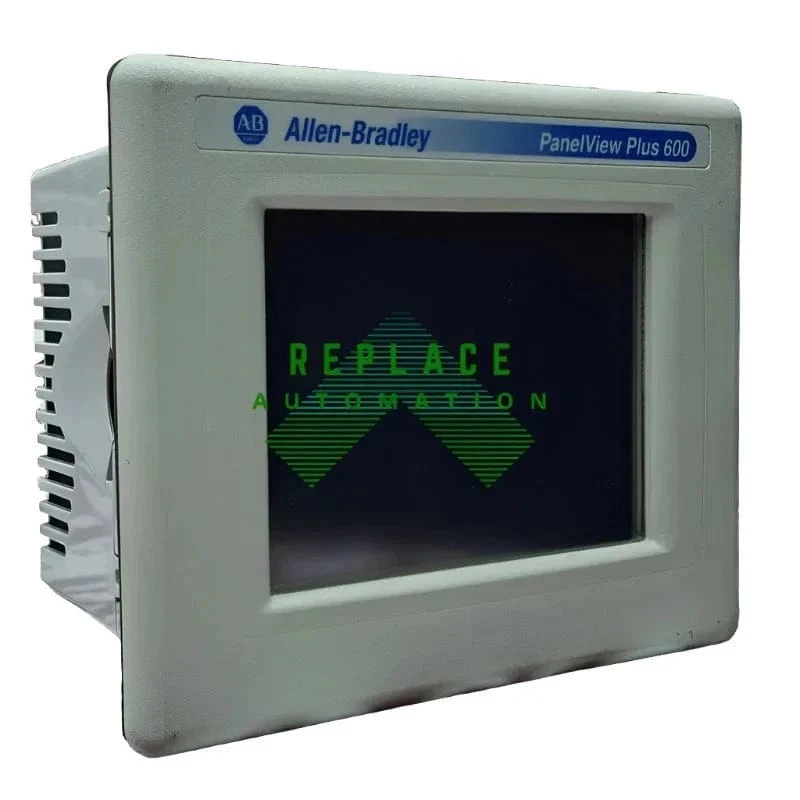
Allen-Bradley PanelView HMI Guide | Applications & Replacement
By Replace Industrial · October 13, 2026 · 10 min read
Contents
- Allen-Bradley PanelView HMI Guide: Applications, Reliability & Replacement
- What Is an Allen-Bradley PanelView HMI?
- What Does an HMI Do in a PLC System?
- Where Are Allen-Bradley PanelView HMIs Used?
- Manufacturing
- Oil and Gas
- Car Wash Automation
- Other Industrial Applications
- Can Allen-Bradley PanelView HMIs Operate in Harsh Environments?
- Water and Moisture
- Oil and Grease
- Dust and Dirt
- Chemicals and Cleaning Solutions
- Temperature Extremes
- Vibration
- Allen-Bradley PanelView Families and Generations
- How to Improve PanelView Reliability in Industrial Environments
- Select the Correct PanelView
- Use an Appropriate Enclosure and Installation
- Inspect Seals and Mounting
- Keep the Touchscreen and Bezel Clean
- Monitor Changes in the Environment
- Common Allen-Bradley PanelView Problems
- What to Check Before Replacing an Allen-Bradley PanelView
- Replacing or Migrating an Older PanelView
- New, Surplus and Used PanelView HMIs
- Should You Keep a Spare PanelView HMI?
- Frequently Asked Questions About Allen-Bradley PanelView HMIs
- What is an Allen-Bradley PanelView?
- Is a PanelView an HMI?
- Does a PanelView replace a PLC?
- Can I replace an old PanelView with a newer model?
- How do I identify which PanelView I have?
- What information should I provide when looking for a PanelView replacement?
- Need an Allen-Bradley PanelView Replacement?
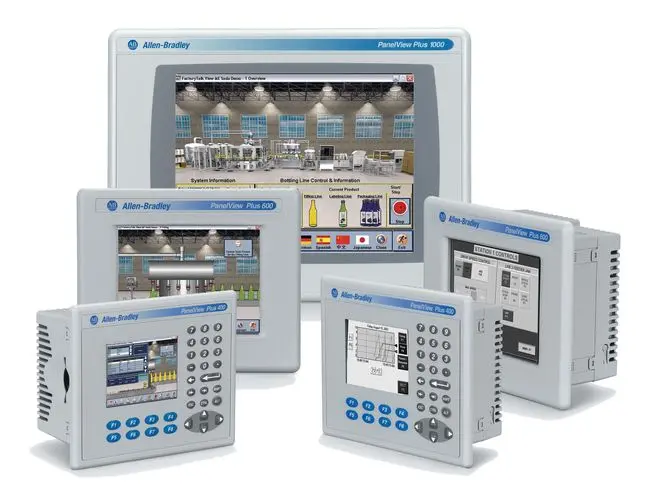
Allen-Bradley PanelView HMI Guide: Applications, Reliability & Replacement
Allen-Bradley PanelView HMIs are widely used throughout industrial automation to give operators a visual interface for monitoring equipment, viewing alarms, adjusting process settings, and controlling automated systems. PanelView terminals are commonly integrated with Allen-Bradley PLCs in manufacturing, oil and gas, automotive, packaging, water and wastewater, car wash systems, and other industrial applications. Choosing the correct PanelView HMI becomes especially important when equipment operates around moisture, dust, oil, chemicals, vibration, temperature extremes, or frequent cleaning. The exact PanelView model, environmental specifications, enclosure, installation, and operating conditions can all affect reliability and service life. This guide covers how Allen-Bradley PanelView HMIs are used, how demanding industrial environments can affect them, common PanelView problems, and what to consider when identifying a replacement terminal.
What Is an Allen-Bradley PanelView HMI?
An Allen-Bradley PanelView is an industrial human-machine interface (HMI) that allows operators to interact with automated machinery and processes. Rather than communicating directly with a PLC through programming software, operators can use the HMI to view machine information and perform permitted control functions through a graphical interface.
Depending on the PanelView model and application, operators may use the HMI to:
- Monitor machine status and production data
- View alarms and diagnostic information
- Adjust process parameters
- Monitor motors and other equipment
- View information from the PLC or control system
- Start, stop, or control permitted machine functions
- Assist maintenance personnel with troubleshooting
Allen-Bradley has produced multiple generations and families of PanelView terminals with different screen sizes, communication options, processing capabilities, environmental specifications, and software requirements. Selecting the appropriate terminal therefore depends on both the automation system and the application.
What Does an HMI Do in a PLC System?
In a PLC-controlled system, the PLC executes the control logic while the HMI provides a visual interface between the operator and the automated process. A PanelView can display information from the control system, including machine status, process values, alarms, diagnostics, and production data. It can also allow authorized operators to send commands or adjust permitted settings. The HMI does not replace the PLC. Instead, the PLC and PanelView perform different roles within the automation system: the PLC executes the control logic, while the HMI makes relevant information and controls accessible to operators.
Where Are Allen-Bradley PanelView HMIs Used?
Allen-Bradley PanelView terminals are used across a wide range of industrial automation applications. The requirements placed on an HMI can vary considerably depending on the equipment, installation, process, and surrounding environment.
Manufacturing
In manufacturing environments, PanelView HMIs may be installed on production lines, assembly equipment, packaging machinery, conveyors, material-handling systems, machine tools, and other automated equipment. Operators may use the HMI to monitor production status, respond to alarms, change permitted process settings, and identify equipment faults. Depending on the facility, the terminal may also be exposed to dust, oil, vibration, temperature changes, or repeated operator contact. Selecting the appropriate PanelView and installing it correctly can help reduce the likelihood that environmental conditions interfere with operation.
Oil and Gas
Oil and gas applications can expose automation equipment to demanding conditions, including temperature variation, vibration, moisture, dust, oil, and other contaminants. The suitability of a PanelView for a particular installation depends on the exact terminal, enclosure, environmental specifications, installation, and requirements of the application. A PanelView suitable for one industrial environment should not automatically be assumed suitable for another. This is particularly important when equipment will be installed in an area with specific environmental, electrical, or location requirements.
Car Wash Automation
Car wash equipment presents a different set of challenges. HMIs may operate around water, humidity, detergents, cleaning chemicals, vibration, and frequent operator interaction. A PanelView used in this environment may provide access to controls and information associated with conveyors, pumps, dryers, motors, alarms, and other automated equipment. Proper installation, sealing, enclosure selection, and cleaning procedures become particularly important where moisture or chemicals are present. In one application involving automated car wash equipment, an HMI provided the operator with information when a problem occurred with equipment associated with the dryer. The interface allowed the operator to respond to the fault and stop operation while the equipment could be inspected.
Other Industrial Applications
PanelView HMIs are also found throughout water and wastewater systems, food and beverage processing, packaging equipment, material handling, automotive manufacturing, process equipment, facility systems, and OEM machinery. The requirements can differ considerably between applications. Control platform, communications, operator requirements, environmental conditions, mounting, and installation should all be considered when selecting an HMI.
Can Allen-Bradley PanelView HMIs Operate in Harsh Environments?
PanelView terminals are designed for industrial applications, but that does not mean every PanelView should be exposed to every industrial environment. Environmental capabilities can vary by PanelView family, catalog number, configuration, enclosure, and installation. Before installing or replacing an HMI in a demanding environment, verify the requirements of the application and the specifications of the exact terminal being used. Several environmental conditions deserve particular attention.
Water and Moisture
Water and moisture can be concerns in washdown areas, car washes, processing facilities, outdoor equipment, and other wet environments. The HMI and surrounding installation should be appropriate for the environment. Sealing, mounting, enclosure condition, cable entry points, and installation can all become important when moisture is present.
Oil and Grease
Manufacturing and process environments may expose operator interfaces to oil, grease, lubricants, and other industrial contaminants. Contamination can accumulate on the touchscreen, bezel, enclosure, and surrounding equipment. Regular inspection and appropriate cleaning can help prevent excessive buildup and make physical damage easier to identify.
Dust and Dirt
Dust and airborne debris are common around machining, material handling, packaging, and other industrial processes. Environmental protection depends on the complete installation rather than simply the fact that the terminal is an industrial HMI. Enclosure condition, mounting, sealing, and maintenance should therefore be considered along with the PanelView itself.
Chemicals and Cleaning Solutions
Some facilities regularly use detergents, sanitizers, solvents, or other cleaning chemicals around production equipment. Repeated chemical exposure can be particularly relevant in applications involving frequent equipment cleaning. The specific PanelView, enclosure, installation, and cleaning procedures should be evaluated for the environment in which the terminal will operate.
Temperature Extremes
Excessive heat or cold can affect electronic equipment, including HMIs. Operating conditions can differ significantly between a climate-controlled facility, an outdoor installation, and equipment positioned near a major source of heat. The environmental specifications of the exact PanelView should be considered rather than assuming all PanelView terminals have the same operating range.
Vibration
Continuous vibration can place additional stress on electronic equipment, mounting hardware, wiring, and connections. Applications involving motors, pumps, compressors, conveyors, and heavy machinery may require particular attention to mounting and the condition of the surrounding installation.
Allen-Bradley PanelView Families and Generations
Allen-Bradley has produced multiple PanelView families and generations over the years. As a result, facilities may have both newer and legacy PanelView hardware operating throughout the same plant. Depending on the age and design of the system, you may encounter PanelView, PanelView Plus, PanelView Plus 6, PanelView Plus 7, PanelView 800, and other PanelView families. These terminals should not be treated as interchangeable simply because they are all PanelView HMIs. Differences may include display size and resolution, touchscreen or keypad configuration, power requirements, communication interfaces, network capabilities, software and firmware, processing and memory, mounting dimensions, and environmental requirements. For a closer look at these considerations, read our guide to choosing the right Allen-Bradley HMI.
How to Improve PanelView Reliability in Industrial Environments
PanelView reliability depends on more than the terminal itself. Proper selection, installation, maintenance, and environmental protection can all affect long-term operation.
Select the Correct PanelView
Start with the requirements of the application. Consider the existing control system, communications, power, display requirements, operator input, environmental conditions, mounting, and any other application-specific requirements.
Use an Appropriate Enclosure and Installation
The HMI should be installed in a manner appropriate for its surrounding environment. The enclosure and complete installation can be particularly important where moisture, dust, chemicals, or other contaminants are present.
Inspect Seals and Mounting
Periodically inspect the HMI installation for deteriorated seals, loose mounting hardware, physical damage, or other conditions that could affect the integrity of the installation.
Keep the Touchscreen and Bezel Clean
Dirt, grease, oil, and other contaminants can accumulate on operator interfaces. Use cleaning procedures appropriate for the terminal and operating environment, and avoid cleaning methods that could damage the touchscreen, bezel, or seals.
Monitor Changes in the Environment
A machine's operating environment can change over time. New cleaning procedures, increased heat, vibration, moisture, airborne contaminants, or modifications to an enclosure may introduce conditions that were not present when the HMI was originally installed.
Common Allen-Bradley PanelView Problems
Even a properly selected and installed PanelView can eventually develop problems, particularly as equipment ages. Common symptoms include a blank or damaged display, touchscreen problems, unexpected restarts, communication errors, boot problems, alarm or diagnostic messages, and intermittent operation. These symptoms do not automatically mean the complete HMI has failed. Power, wiring, communications, network equipment, configuration, environmental conditions, and other components in the system may also affect operation. Before replacing a PanelView, document exactly what the terminal is doing and when the problem occurs. This information can make troubleshooting and replacement identification easier.
For a more detailed diagnostic process, see our Allen-Bradley PanelView Troubleshooting Guide.
What to Check Before Replacing an Allen-Bradley PanelView
When a PanelView fails or needs to be replaced, avoid selecting another terminal based only on appearance or screen size. Similar-looking PanelView terminals can have important differences in power, communications, operator input, mounting, software, firmware, and other characteristics. Before sourcing a replacement, record the complete catalog number, series, revision, display size, touchscreen or keypad configuration, input power, communication interfaces, network configuration, mounting information, environmental requirements, and existing PLC or control platform. The product label is one of the most useful sources of information when identifying an existing PanelView. Before removing the terminal, take a clear photograph of the entire label whenever possible. That information can help determine whether an available terminal is an appropriate match or whether additional changes would be required.
Not sure which PanelView you have? See our How to Identify an Allen-Bradley PanelView Catalog Number guide.
Replacing or Migrating an Older PanelView
When an older PanelView reaches the end of its service life, replacing the HMI does not necessarily mean the entire automation system must immediately be redesigned. Depending on the application, a facility may choose to source compatible hardware for the existing platform, maintain spare legacy equipment, repair existing hardware, or migrate to a different PanelView generation. The appropriate path depends on factors such as hardware availability, PLC and network compatibility, application requirements, software requirements, downtime constraints, and the amount of engineering required for a migration. Facilities operating older PanelView Plus hardware can also read our PanelView Plus to PanelView Plus 6 migration guide for an example of the considerations involved when moving between PanelView generations.
New, Surplus and Used PanelView HMIs
For facilities maintaining existing automation systems, replacement PanelView hardware may be available in new, surplus, or used condition. This can be particularly important when a machine depends on a PanelView generation that is no longer readily available as current production hardware. Maintaining an existing platform may reduce the engineering, programming, installation, and downtime associated with changing the operator interface. In other situations, migrating to a different PanelView platform may make more sense. The decision should be based on the existing equipment, availability of compatible hardware, criticality of the application, long-term requirements, and scope of any changes required to move to another platform.
Browse Allen-Bradley PanelView HMIs
Should You Keep a Spare PanelView HMI?
For critical equipment, keeping a compatible spare PanelView can reduce the amount of time spent sourcing hardware after an unexpected failure. This can be particularly useful for legacy machines where compatible hardware may become more difficult to locate quickly. A spare should still be selected carefully. Matching the complete catalog number is preferable when possible, while series, revision, power, communications, application requirements, and other compatibility factors may also need to be considered. The value of a spare is highest when the facility has already documented the installed HMI and understands what will be required to put the replacement into service.
Frequently Asked Questions About Allen-Bradley PanelView HMIs
What is an Allen-Bradley PanelView?
Allen-Bradley PanelView is a family of industrial human-machine interfaces used to display information from automated systems and provide operators with access to permitted machine controls, alarms, diagnostics, and process information.
Is a PanelView an HMI?
Yes. PanelView terminals are human-machine interfaces, or HMIs. Different PanelView generations and models are designed for different automation systems and applications.
Does a PanelView replace a PLC?
No. A PLC and HMI perform different functions. The PLC executes the machine or process control logic, while the PanelView provides the operator interface used to view information and interact with permitted functions.
Can I replace an old PanelView with a newer model?
Possibly, but a newer PanelView should not automatically be assumed to be a direct replacement. Power, communications, software, firmware, screen size, mounting, application requirements, PLC compatibility, and other factors may need to be evaluated before changing platforms.
How do I identify which PanelView I have?
Start with the product label. Record the complete catalog number, series, revision, power information, and any other identifying information shown on the terminal. Taking a clear photograph of the entire label can make it significantly easier to identify the existing HMI and search for compatible replacement hardware.
What information should I provide when looking for a PanelView replacement?
The complete catalog number is the best starting point. Providing the series, revision, photos of the product label, and information about the existing application can also help identify the correct hardware.
Need an Allen-Bradley PanelView Replacement?
If you are trying to replace an existing Allen-Bradley PanelView, start with the complete catalog number from the existing terminal. A clear photo of the product label is also extremely helpful, particularly when the PanelView is part of an older or legacy automation system. We can help identify the existing PanelView and check available options for maintaining your equipment.
Browse Allen-Bradley PanelView HMIs or request a quote with the catalog number or a photo of the existing unit.